
Joomla spam sending - spam protection for contact form and registration
 Joomla has, in the past, gained a bit of a reputation as a spam machine. Unfairly so, because there are simple ways to fix it! Cyberattacks are commonplace on the internet these days. All the more important, then, to protect yourself against them.
As soon as a new website can be found in the Google index, it starts - the first bots stop by. With the exception of search engine bots, you rarely benefit from their visits. Among the most annoying of their kind are spambots - always on the lookout for unprotected forms.
In the standard setup, Joomla has three forms without out-of-the-box active spam protection.
Joomla is sending spam - where are all these emails coming from?
Joomla includes the following functions that can be responsible for excessive email sending:
- Contact forms (recognizable by "This is an email inquiry via" ...)
- User registration (spam sign-ups)
- Referral function (send email to a friend)
It does not matter whether the contact form or registration is actually integrated on the site. The direct links also work without a menu link.
Particularly dangerous is the contact form's "copy to sender" function. It allows emails with any content to be sent to any email address - an open invitation for spammers. It is therefore better to do without this feature.
You can find the setting under Components -> Contacts -> Options (top right) in the Form tab.
Clear identification of the cause through access log analysis
Every form submission appears in the web server access logs as a POST request. If you look at them, you can identify the exact URL through which the spam is being sent. For analysis, you are welcome to use our log analysis tool.
In this example output, the contact form (com_contact) would be the cause: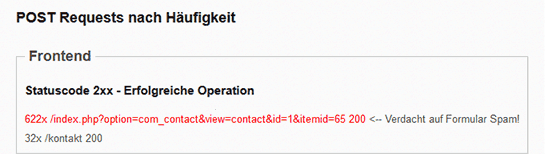
Spam protection solutions
OSpam-a-not - Honeypot & Time Lock 🍯
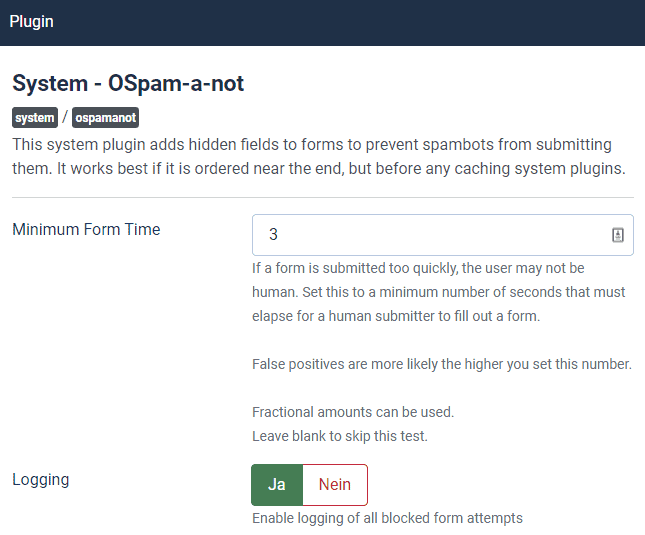 A very simple way to protect Joomla sites from spam is the OSpam-a-not plugin from Joomlashack. It equips all forms in the frontend, regardless of extension, with a honeypot and a time delay.
A honeypot is a hidden field that is not visible to normal visitors, but is filled out by most spambots. If this happens, the form cannot be submitted. In addition, a time delay can be set (e.g. 3 s), meaning the page must have been open for at least that long before the form can be sent. Spambots usually act faster.
The plugin can be installed via the extension directory in the backend or downloaded here: https://extensions.joomla.org/extension/ospam-a-not/
The last version compatible with Joomla! 2.5, version 1.1.7, is available on GitHub.
Spam protection with built-in tools - integrate ReCAPTCHA v2 / v3 via plugin
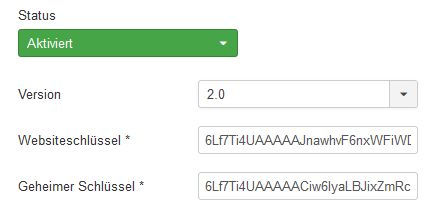 With the ReCAPTCHA plugin, Joomla already offers effective spam protection for forms out of the box. To use the plugin, it must first be activated in the backend under Extensions -> Plugins -> Captcha - ReCAPTCHA.
Configuration requires an API key pair consisting of the "site key" and the "secret key".
You can get the key pair here:
https://www.google.com/recaptcha/admin
After that, the ReCAPTCHA plugin can be set globally as the default captcha in the Joomla system configuration. This integrates it into both the contact form and user registration. Newly created unknown users and contact form spam should then be a thing of the past.
Joomla 2.5 ReCAPTCHA v2 fix
For Google ReCAPTCHA v2 to work on an old Joomla 2.5 system as well, an adapted /plugins/captcha/recaptcha/recaptcha.php must be uploaded. By default, only v1 is supported (shut down by Google).
You can download the file here.
For the upgrade to Joomla 3.10.12, we would be happy to provide you with a favorable quote.
Prevent spam registrations from the outset
Most Joomla sites do not need a user registration function at all. Spam users are usually created with non-existent email addresses. This is the reason for the Mail delivery failed: returning message to sender email bounces that pile up massively along with user registrations.
Under Users -> Manage -> Options (top right), registration can be disabled.
Delete thousands of unknown users from the database
Depending on how aggressive the spambots are, without protective measures there may already be several thousand unknown users. Deleting them through the backend is then tedious or even impossible.
With this SQL command, all user accounts that are not active are deleted in one go (replace #__ with your table prefix):
DELETE FROM `#__users` WHERE `lastvisitDate`='0000-00-00 00:00:00'
Advanced spam protection with EasyCalcCheck Plus (ECC+)
Unlike the core plugin, ECC+ by Viktor Vogel covers a wide range of third-party extensions directly.
One of the most important and very useful features is the configurable time lock. For example, you set this to 5 seconds - that alone already leaves most spambots with nothing to chew on. Normally, only 2-3 s pass between opening the form and submitting it.
At present, the following extensions can be protected in addition to the core extensions (registration + contact form):
- aiContactSafe
- ALFContact
- Community Builder
- DFContact
- Easybook Reloaded
- Fox Contact
- Flexi Contact
- Flexi Contact Plus
- IProperty Real Estate
- JomSocial
- Kunena Forum
- Phoca Guestbook
- Virtuemart

Instead of ReCAPTCHA v2, you can also configure arithmetic tasks and custom questions. In addition, various other anti-spam services and security settings can be used. When it comes to spam protection, EasyCalcCheck+ is the all-in-one solution.
Set up spam protection - we’ll take care of it for you!
If you do not want to deal with it yourself, we will gladly install effective spam protection for you.
As part of the 30 min Quick Supports, the cost for this is only 59 € incl. VAT.
[ Start live chat ] This email address is being protected from spambots. You need JavaScript enabled to view it.
Image credit: master1305 - Fotolia.com
- Details
- Last Updated: 30 August 2018

ReCaptcha V2 is not supported by Joomla 2.5. The most sensible option (and long overdue) would be an upgrade to Joomla 3.
As a temporary workaround, there is a fix here - just replace /plugins/captcha/recaptcha/recaptcha.php:
altersoftware.it/.../joomla25_captcha_v2
I have updated the post accordingly.