
Joomla update mail - disable update notification
As soon as a new Joomla update is available, Joomla sends an email to all administrators by default. This is not spam, and the update notification can simply be disabled in the plugin settings.
The email with the subject "Joomla! update for example.org available ..." already contains all the important information.
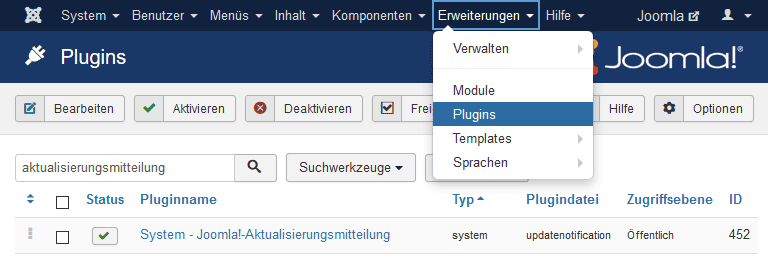
Log in to the admin area (under /administrator), open Extensions -> Plugins, and search for "Update Notification".
In the overview, the system plugin can be deactivated with a click.
I can't log in to the admin area
If you can no longer reach your administrator and do not have access to the admin area yourself, simply contact us via Chat. We generally help with login problems free of charge.
Why you should not turn off notifications about Joomla updates
Some people see the system update notifications as spam. If the update is ignored repeatedly, countless emails can accumulate over time.
However, the updates sometimes contain security-relevant fixes and should be carried out promptly, especially in this case. If you do not already log in to the backend regularly, you are well advised not to disable the notifications.
If you don't feel like dealing with constant Joomla updates, but care about the security of your website, our Joomla Update service may be just right for you?
Joomla!-Aktualisierung verfügbar

Diese E-Mail WIRD NICHT von joomla.org gesendet. Sie wird automatisch durch die nachfolgende Website verschickt:
Joomla Beispiel Webseite - https://example.org/administrator/

================================================================================
AKTUALISIERUNGSINFORMATIONEN
================================================================================

Die Website hat festgestellt, dass eine aktualisierte Version für Joomla! zur Verfügung steht.

Aktuell installierte Joomla!-Version: 3.9.15
Zur Installation verfügbare Joomla-Version: <?php echo JVERSION; ?>

Diese E-Mail soll nur über die Verfügbarkeit der Aktualisierung informieren.
Sie wird automatisch von der Website versendet. Das Joomla!-Projekt hat keinen Zugriff auf die hinterlegte E-Mail-Adresse und versendet daher auch keine E-Mails.

================================================================================
AKTUALISIERUNGSANLEITUNG
================================================================================

Um die Aktualisierung für "Joomla Beispiel Webseite" zu installieren, bitte auf den folgenden Link klicken oder diesen in die Adressleiste des Browsers kopieren.

Link zur Aktualisierung: https://example.org/administrator/index.php?option=com_joomlaupdate

Release-Nachrichten können hier gefunden werden: https://www.joomla.org/announcements/release-news/

================================================================================
WARUM BEKOMME ICH DIESE EMAIL?
================================================================================

Diese Email wurde automatisch durch ein Joomla!-Plugin versendet. Joomla! ist die Software mit der Ihre Website betrieben wird.
Dieses Plugin prüft neu verfügbare Versionen von Joomla! und sendet eine E-Mail an die Administratoren.
Sie erhalten weitere Emails von Ihrer Seite bis Sie Joomla! aktualisieren oder die E-Mails deaktivieren.

Um die E-Mails zu deaktivieren, muss das "System - Joomla!-Aktualisierungsmitteilung" in der Plugin-Verwaltung deaktiviert werden.

Falls Sie diese Email oder die notwendigen Schritte zur Aktualisierung nicht verstehen, kontaktieren Sie bitte NICHT das Joomla!-Projekt.
Das Joomla!-Projekt sendet Ihnen keine E-Mails und kann Sie nicht unterstützen. Kontaktieren Sie stattdessen die Person, die Ihre Seite erstellt hat oder verwaltet.

Bitte beachten Sie, dass das Plugin "System - Joomla!-Aktualisierungsmitteilung" eventuell automatisch aktiviert wurde, als Sie Joomla! installiert oder aktualisiert haben.
- Details
- Last Updated: 11 March 2020


