
Google Ads help - Rejected: unwanted or harmful software (malware)
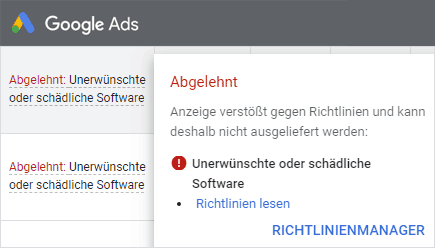 If you advertise with Google, the message "Rejected: Unwanted or harmful software" is often an initial indication that your website has been hacked. Google Ads (AdWords) reacts very sensitively to unwanted software and harmful links. Individual ads or entire campaigns are quickly rejected and suspended until further notice because of injected malware.
Immediate help: So that your ads can start running again as quickly as possible, we will be happy to take care of your suspended Ads account. We thoroughly analyze the affected website and investigate the rejection reason in your Google account. After cleanup and securing the site, we also handle further communication with Google Ads Support.
The official Google Ads advertising policies help article can be found here:
https://support.google.com/adspolicy/answer/6020954?hl=de
Ads rejected due to malware that is not always obvious
Unwanted and harmful software is generally referred to as malware. Malware usually spreads as a result of hacker attacks on websites. This can include redirects, popups, spam content, or hidden links to spam pages.
Upon request, you will receive a list of harmful content or links from Google Support.
Finding this harmful content is usually not that easy. In some cases, harmful content is only displayed sporadically or only with certain referrer page + browser combinations ("Referrer" + "User Agent").
Checking the website for harmful links
A useful tool for simulating these two variables is urlscan.io:
https://urlscan.io/
This makes it possible to simulate a limited number of typical referrer pages (such as Facebook, Google, Bing..) in combination with common browsers/operating systems (Chrome, Android, iPhone..).
More tools
It is of course also advisable to keep a permanent eye on the status of the advertised website via Google Search Console (formerly Webmaster Tools). Under "Security & Manual Actions", security issues or injected content may be listed. However, that is by no means always the case. Sometimes the problems appear there only after a delay or not at all. The reason is that Googlebot visits your website much more frequently when you run ads. When it comes to malware and unwanted software, the Ads department reacts more sensitively and with little delay.
Other reasons for rejection
Rejected ads do not necessarily mean that the website was actually hacked. If the landing page offers software downloads or links to other content that does not comply with Google guidelines, that can also be a reason for rejection.
Reinstating suspended campaigns
- Make sure there is no malware or harmful links left on the website.
- Fix the cause of the hack, not just the symptoms. Otherwise, the site will be reinfected shortly.
- Trigger reindexing via Google Search Console. Ideally, submit a sitemap again as well.
All pages in the Google index (cache) must be clean. - Ask Google Ads Support for a review again.
Google Cache and old findings that no longer reflect the current state of the live site are a known problem with ongoing rejections. If the site has definitely been cleaned, persistence and patience with Ads Support are essential.
If you still do not succeed after several attempts, we will be happy to perform an in-depth analysis of the affected page and also handle further communication with Google. After a thorough review and confirmation that everything is clean and secure, we will arrange escalation to the specialist department if necessary.
Note: There are currently delays with Google Ads Support. The phone hotline is currently unavailable and email responses can take 2-3 days or longer.
Update from 03/04/2020
Durch die momentane Situation möchte Google lange Wartezeiten ersparen und hat aufgrund dessen ein neues Feature für alle Kunden bereitgestellt. Man hat jetzt die Möglichkeit, die abgelehnten bzw. eingeschränkten Anzeigen selber überprüfen zu lassen.

Folgen Sie dazu bitte nur nachfolgender Anleitung, um die Überprüfung selber einzureichen.
- Klicken Sie auf Ihre gewünschte Kampagne.
- Gehen Sie im hellgrauen Menü auf Anzeigen & Erweiterungen.
- Gehen Sie mit Ihrer Maus auf den abgelehnten Status von der jeweiligen Anzeige.
  Es muss sich ein kleines neues Fenster öffnen.
- Klicken Sie bitte auf "Einspruch einlegen".
- Wählen Sie die gewünschte Option, gegen welche Anzeigen Sie Einspruch einlegen wollen.
- Um den Status Ihres Einspruchs zu überprüfen, folgen Sie bitte folgender Anleitung.
  Klicken Sie auf Tools & Einstellungen, oben rechts.
  Wählen Sie unter Einrichtung -> Richtlinienmanager.
  Wählen Sie links Einspruchsverlauf.
- Details
- Last Updated: 03 April 2020
