
Joomla update is not shown - update manually (guide)
A common problem is that no update is displayed despite an outdated Joomla version. You can see the current version of your Joomla installation in the lower right area of the admin section.
If no Joomla update is detected, please follow these instructions:
- Under Extensions -> Manage -> Update, [ Clear ] the cache and then [ Check for Updates ]
- Under Extensions -> Manage -> Database, if necessary, [ Repair ] the database
- Under Components -> Joomla! Update, click the [ Check for Updates ] button
The update should now appear and you can install it.
Please note that the update does not take place in one go, but step by step as suggested by the system:

Install the Joomla update from 3.x to 3.10.12 manually
In some cases, none of the 3 suggested steps help and an automatic update is not possible. Instead, the Joomla update can be carried out manually. Up to version 3.4.8, you can also update via the Extension Manager - after that only via the update component.
- Download the 3.4.8 Upgrade Packages
- Install the ZIP package file via Extensions -> Manage -> Install
As mentioned, the subsequent updates can now only be installed via the Update component, where they should be shown again in the future.
Automatic update does not work
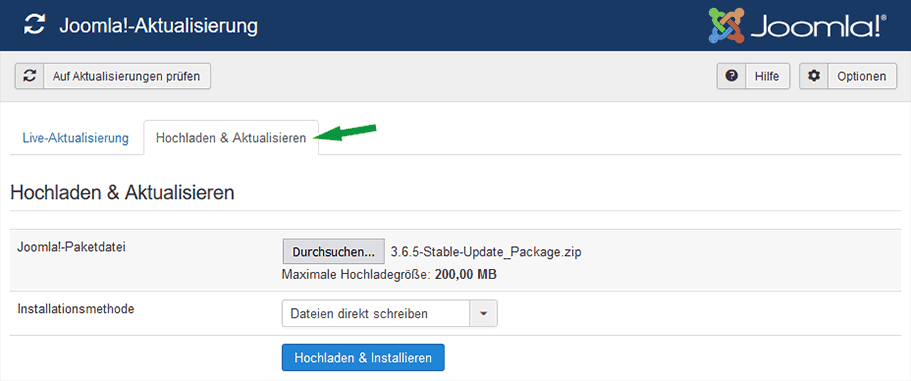
If the automatic update from a version >= Joomla 3.5 still does not work, the J!-Update component also offers the option to upload the appropriate upgrade package instead of the live update.
Update Joomla manually via FTP (video guide)
Below is a guide on how to perform the Joomla update manually via FTP.
Here too, the update steps mentioned above must be followed.
- Download the appropriate upgrade package
https://downloads.joomla.org/de/cms/joomla3 - Upload the ZIP file to the Joomla root directory
- Upload the Akeeba Kickstart script (to extract the ZIP file directly on the server)
- Open example.org/kickstart.php
- Open the admin area
- Repair the database under Extensions -> Manage -> Database
- Update all extensions
- Important: delete kickstart.php
Joomla Update service
If further problems arise, we will be happy to handle the Joomla update for you.
Optionally together by phone & screen sharing.
[ Start live chat ] This email address is being protected from spambots. You need JavaScript enabled to view it.
- Details
- Last Updated: 23 July 2019


