
Switch WordPress to PHP 8.1
On 14.11., PHP 7.4 was switched off at Hosteurope. Other web hosting providers are following suit. Pushing through "offline" updates afterward is generally possible - we can help with the migration.
What is PHP
PHP is a server-side scripting language that is mainly used to create web applications. It is used by millions of websites and web applications, including WordPress. PHP is continually being developed to improve performance, security, and functionality.
Why is the switch to PHP 8.1 necessary?
Switching to PHP 8.1 brings several benefits for your WordPress website, including:
Better performance: PHP 8.1 offers faster execution speed than its previous versions, resulting in faster loading times for your website.
Greater security: PHP 8.1 includes numerous security improvements that better protect your website against potential threats.
New features: PHP 8.1 offers many features and improvements.
How do you prepare your WordPress website for the switch to PHP 8.1?
Before switching your WordPress website to PHP 8.1, make sure it is up to date and that no outdated plugins or themes are being used. Here are a few steps you can take to prepare your website for the switch:
Check the compatibility of your plugins and themes: Make sure that all plugins and themes you use on your website are compatible with PHP 8.1. If not, you should update them.
Back up your website: Create a backup of your website before you start switching to PHP 8.1. This way, you can restore your website in an emergency if problems occur during the transition.
Check your server requirements: PHP 8.1 has higher server requirements than older versions. Make sure your hosting provider meets the necessary requirements.
PHP 7 shutdown by many web hosts
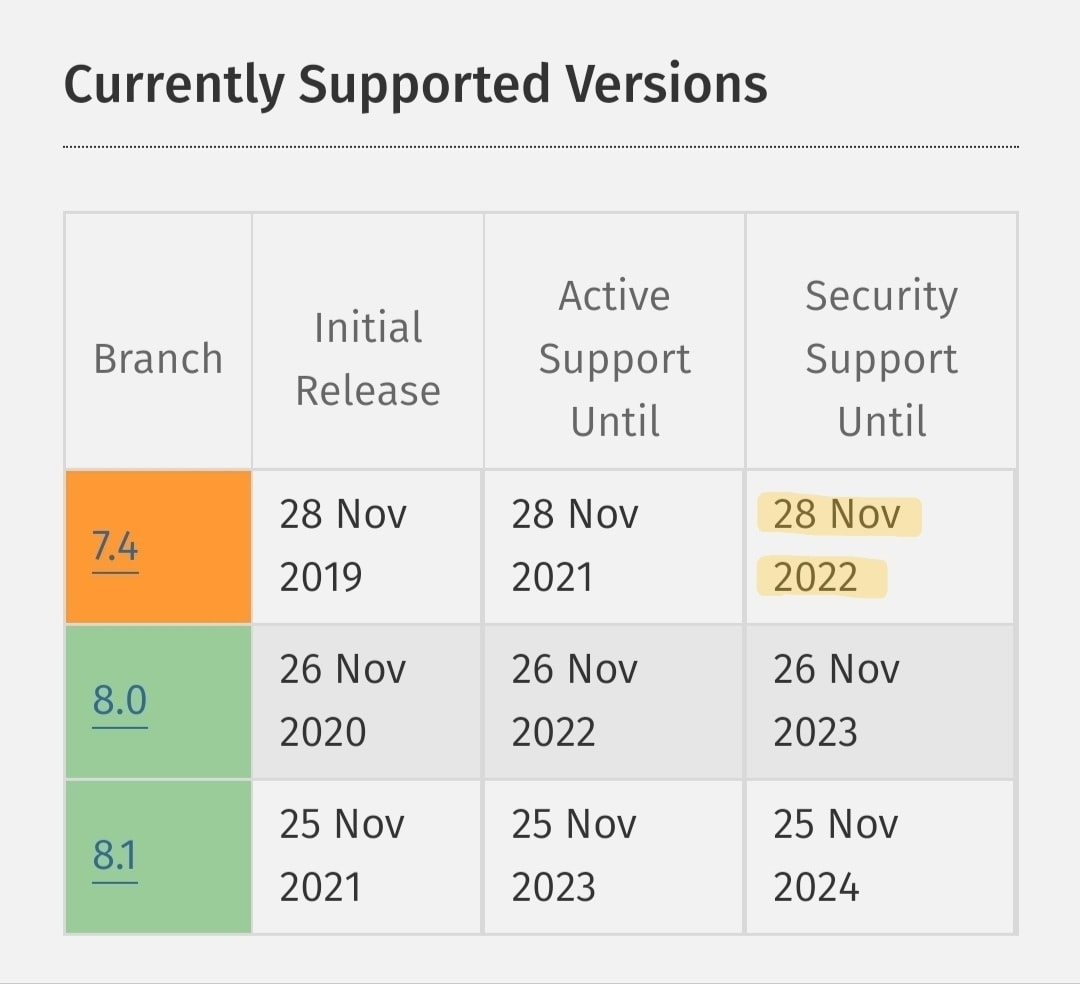
Some web hosting companies shut down PHP 7 early because PHP 7 has not been actively supported since the end of 2022 and there are some known security vulnerabilities and compatibility issues that are not being fixed. Some web hosting companies shut down PHP 7 early to make their servers and customer applications more secure and stable.
Some examples of web hosting companies that shut down PHP 7 early are:
Host Europe shut down PHP 7.4 back in 2022 to ensure that customers upgrade to a current and secure version of PHP.
One.com: The host One shut down PHP 7 at the end of 2022 and asked customers to upgrade to a supported PHP version.
IONOS launched paid PHP Extended Support for PHP 7.4 at the end of 2022 and asked customers to upgrade to a current version of PHP to keep their websites secure and stable.
- Strato handles PHP 7.4 Extended Support similarly to IONOS. A fee of €7 per month applies if the older PHP version remains in use.
However, it is important to note that many web hosting companies offer their customers a transition period before shutting down a PHP version, giving users enough time to update their applications to a supported version. If you are affected by a web hosting company that has shut down PHP 5, you should refer to its website or support services for more information on how to upgrade to a supported PHP version.
Have WordPress errors and issues fixed during the PHP 8.1 update
We offer a professional service to update your WordPress website to the latest supported version of PHP. This includes:
- Checking your website's current PHP version and determining compatibility with the latest version
- Backing up your website and database
- Updating the PHP version to the latest supported version
- Reviewing the website to ensure that all plugins and themes are compatible with the updated version of PHP
- Troubleshooting, if required
We work quickly and efficiently to ensure that your website is affected as little as possible during the update process. We are happy to answer questions and provide support for maintaining your website.
Conclusion
Switching to PHP 8.1 brings numerous benefits for your WordPress website. However, it is important that you prepare your website before you begin the switch. Make sure your plugins and themes are up to date, back up your website, and check your hosting provider's server requirements. By preparing for the switch to PHP 8.1, you can ensure that your website makes the PHP transition smoothly.
