
Webspace at ALL-INKL hacked - virus found in account - tips
 Photo © ALL-INKL.COM
The ALL-INKL virus scanner reports virus findings? ALL-INKL is one of the best web hosts in Germany with exemplary malware handling. Find out here how to optimize account security after the webspace has been hacked (or proactively).
Webspace hacked - the antivirus scanner notification
As soon as the ALL-INKL virus scanner finds a virus or malicious files in the account, you will receive this email:
Sehr geehrte Damen und Herren,
Sie erhalten diese automatische E-Mail von unserem Virenüberwachungssystem.
Ihre E-Mail-Adresse wurde von Ihnen als Kontakt für den betreffenden Account hinterlegt.
* VIRENFUND *
Bei einem routinemäßigen Virenscan wurden in Ihrem Account wXXXXXXX (example.org) Dateien mit Schadcode gefunden. Um die Besucher Ihrer Webseite zu schützen, haben wir diese Dateien nach Möglichkeit umbenannt und gesperrt.
* URSACHEN *
Häufige Ursachen für Virenbefall im FTP-Account sind Sicherheitslücken in oft nicht aktualisierten Scripten wie CMS, Shop, Forum, Gästebücher usw., oder ein Befall mit Schadcode auf dem PC, mit dem die Webseite bearbeitet wurde.
* MASSNAHMEN *
Loggen Sie sich bitte umgehend in die technische Verwaltung Ihres Accounts ein und folgen Sie den Anweisungen im Menüpunkt "Wartungscenter".
* ACHTUNG *

Nicht alle Dateien konnten automatisch gesperrt werden. Bitte desinfizieren Sie diese manuell!
Unlike many other web hosts that block the entire webspace after a successful hacker attack, ALL-INKL only blocks the files containing malicious code. This makes securing and restoring the hacked account much easier.
Note: Is your website hosted not with ALL-INKL but with IONOS, and have you received an email there with the subject "Attack on your IONOS contract"? Then our dedicated guide can help you further: Attack on your IONOS contract - what the email means and what to do.
A backup date is even suggested based on the creation or modification date of the virus scanner's detections.
Warning: Just because the ALL-INKL virus scan did not previously detect any malicious files does not necessarily mean that the suggested backup is clean. A thorough check should still be carried out here as well.
Securing webspace - Recommended measures at ALL-INKL
In addition to the usual measures after a hacker attack, i.e. restoring a backup, rebuilding or cleaning up the website(s), the following points should be observed at ALL-INKL.
1. Activate access logs with a long retention period
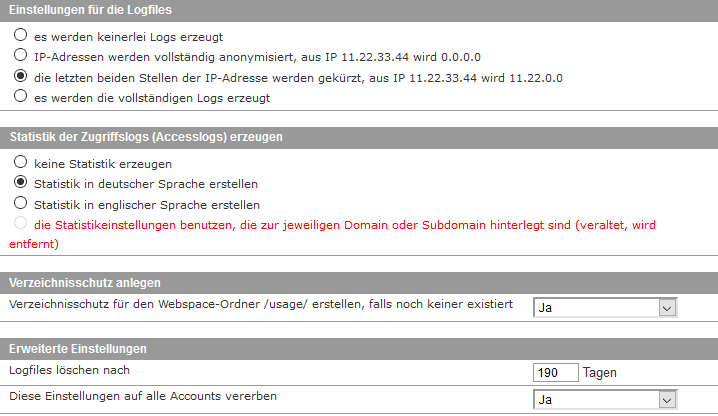
For a hack to be analyzed and for it to be possible to trace what happened on the webspace, it is important that access logs are available. For a clear presentation of access logs, our log file analysis tool is ideal. In the KAS, under Settings -> Logs & Statistics, make sure that logs are being generated.
The screenshot shows the recommended settings.
2. Block external database access
In recent months in particular, many hacks have aimed to read database credentials from the configuration files of CMS platforms. For example, in the past it was possible on WordPress sites, due to some plugin security vulnerabilities, to read the wp-config.php file.
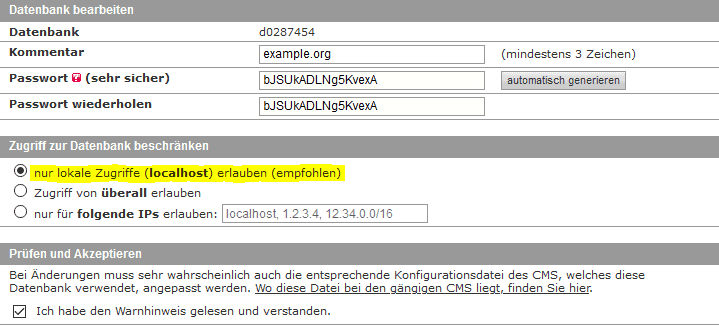
If database access from anywhere is allowed (the former default setting at ALL-INKL), this is a critical vulnerability.
Attackers can directly access the database from outside and manipulate its contents at will - create users, inject malicious scripts or spam links.
Therefore, make sure that only local access to the database is possible. In addition, after the webspace has been hacked, always change all database passwords.
3. Separate individual websites into subaccounts
The last, but by far most important security tip, is to never operate multiple websites in the same account. If everything runs under the same system user, a security vulnerability in one installation is enough for all websites in the same account to be hacked.
At ALL-INKL, there is therefore the option to create a separate subaccount for each individual domain.
To implement the isolation afterwards, a useful account transfer tool is available in the KAS. The isolation can be carried out in the following steps:
- Accounts -> + Create new account.
- Select "without host" in the top tab.
- Enter the domain name in the account comment for assignment.
- Allocate the resources accordingly.
- Log into the newly created subaccount from the account overview.
- In the menu of the new subaccount, open Tools -> Account transfer -> FTP data.
- Enter the FTP login details of the main account.
- Enter the source path of the domain to be transferred (for simplicity, use the same path as the destination path).
- On the next page, enter a confirmation email address for notification of the successfully completed copy process.
- Then, in the main account, open Tools -> Move hosts.
- Select the domain from the main account that is to be moved to the new subaccount.
-> The domain is now connected to the subaccount.
- Select the domain from the main account that is to be moved to the new subaccount.
- If necessary, adjust the absolute server path in configuration files.
- This would be necessary, for example, for common caching plugins or, if you use Joomla, $log_path and $tmp_path would need to be adjusted in the configuration.php.
(At ALL-INKL, the server path begins with /www/htdocs/wXXXXXX/...)
- This would be necessary, for example, for common caching plugins or, if you use Joomla, $log_path and $tmp_path would need to be adjusted in the configuration.php.
- Delete the directory that was successfully moved to the subaccount from the main account.
The databases can remain in the main account for a good overall overview. Moving them to the subaccount afterwards is not necessary - it would also provide no security advantage.
All email addresses assigned to the respective domains are automatically moved to the subaccount via "Move hosts" and can from then on only be managed there. No further adjustments are necessary. In the process, only sufficient quota should be ensured in the subaccount resource allocation.
These best practices create the foundation for secure webspace. If something should ever go wrong from a security perspective and the virus scanner triggers, the impact is kept to a minimum. If multiple websites are operated in the same hosting package, separation into subaccounts helps prevent the entire webspace from being hacked. The spread of a virus is effectively prevented by separate system users.
The comment function can be used for questions and suggestions.
- Details
- Last Updated: 16 June 2020

that is exactly what happened to me too. And that is exactly what I had thought back then as well.
Well then, the work is worth it in hindsight.