
Securing Joomla .htaccess in the root directory - HTProtect Server-Shield
 HTProtect is a free Joomla component that secures your site with just a few clicks and keeps it automatically up to date - primarily via the central .htaccess (the web server control file that determines which requests are allowed through at all). It runs on Joomla 2.5 to 6, on Apache and LiteSpeed (for nginx there is a ready-made rules block) and under PHP 7.4 to 8.5.
🆕 htprotect.app - Easy Multi-Site Management for Joomla.
Current version: HTProtect 2.3.0 · 20. June 2026
Download: HTProtect
Free Joomla component (com_htprotect), version 2.3.0. For Joomla 2.5 to 6 on Apache and LiteSpeed (nginx: ready-made rule block), PHP 7.4 to 8.5. License: GNU GPL v2 or later.
Download htprotect-shield-joomla.zip
Then install it in the Joomla backend under Extensions > Manage > Install > Upload Package File.
Or, without file upload, directly via "Install from URL" (Extensions > Manage > Install > Install from URL) - enter this URL:
HTProtect in the Joomla Extensions Directory
Quick start: secured in 3 minutes
- Install. Download the ZIP above and upload it in the backend under Extensions > Manage > Install. HTProtect will then open automatically.
- Click "Secure now". On the overview, one click is enough: HTProtect applies the recommended settings, writes the protected .htaccess, hardens the upload folders (blocks executable code there), tests everything, and automatically creates a backup beforehand.
- Turn on "Automatic monitoring" and enter an email address. This activates real-time protection, the watchdog (monitors the protection files), and automatic security updates - and you will receive an email if anything is wrong.
Done - the site is secured in about 3 minutes.
4. If something is not working in the frontend (images, CSS, or individual functions are missing): Start the 403 check under "Site Scan" - it finds content that has been blocked by mistake and suggests the appropriate release. If that does not help, open the browser console (right-click > Inspect or F12) and look for blocked resources (status 403). Allow them in HTProtect under the single-file or directory exceptions.
5. In case of suspected hacking: Also run the malware scanner under "Site Scan" - it finds injected malicious files, shows their contents for review, and removes them with a click. What it clearly identifies as malicious code, it also uses as a clue: it additionally looks for all files with the same timestamp. Attackers usually place their backdoors in one go - this also reveals the late arrivals for which there is not yet a signature. Proceed carefully: review the content before deleting, do not remove blindly - false positives can never be completely ruled out. The safest option is always a backup restore from before the attack.
6. Integrity scan: Then start the core file comparison directly below in Site Scan. It compares every Joomla core file with the original of the installed version and shows what has been changed or does not belong there - even if the injected code does not match any known signature. Together, the malware scanner and core file comparison are the most powerful free solution for uncovering malicious code in a Joomla installation: the scanner finds the known threats and their late arrivals, while the comparison reveals what is hidden in the core directories.
What HTProtect does
Level 1: The essentials (everyone benefits from this)
- One-click security ("Secure now"): One button applies the recommended settings, writes the protected .htaccess, hardens the upload folders, and automatically tests everything.
- Exploit shield: Blocks known Joomla attacks (e.g. against JCE, Novarain, Astroid, API leaks) and unknown attacks of the same type in two layers: via .htaccess (takes effect before PHP) and a real-time firewall in the background that also stops attacks in the hidden POST part (submitted form data).
- Upload folder hardening: Blocks PHP execution in folders such as
imagesandmedia, and this still works even if the main .htaccess is deleted (so an uploaded malicious file will not run). Internal directories such astmp,cacheandlogs- and any others that do not need PHP - are already completely blocked via the main .htaccess anyway. - Shield (.htaccess): Allows PHP only through permitted entry points (even disguised files such as
bild.php.jpgare blocked), allows only certain file types, blocks sensitive files and internal folders, sets security headers (instructions that protect the browser), enforces HTTPS, and speeds up the site with caching and compression. Existing custom rules are detected and carried over in the same positions - nothing is lost during hardening. - Backend access protection: Sets up an additional password prompt before the Joomla login (/administrator) and also detects protection already configured by the host.
- Self-test with automatic rollback: After writing the changes, HTProtect checks the site itself, and if anything goes wrong, the previous state is automatically restored (so nothing gets broken).
Stage 2: Monitoring and ongoing protection
- Automatic monitoring + email alert: Checks in the background for suspicious changes and reports them in a bundled email. Deliberately without alert spam: repeated findings are grouped together, and a reminder is sent only after 14 days. Runs completely without an external cron job.
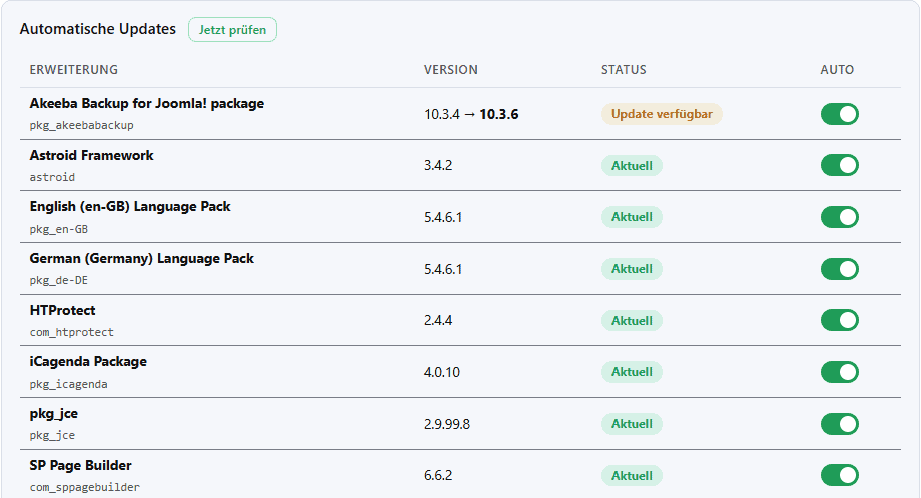
- Automatic extension updates - your website maintains itself: HTProtect keeps your extensions up to date on their own, according to your schedule.

- Selectable update interval with time: weekly, daily, or practically immediately (at 15-minute intervals).
- Security updates for extensions run immediately, with no waiting time.
- Selectable grace period for normal updates (none, 3, 7, or 14 days), so an update can mature before it is installed automatically.
- The malware scanner runs with every automatic update: if it triggers, the update is rolled back immediately and automatically. False positives (in most cases they are) are evaluated centrally, entirely without site-specific or personal data; the next run then uses the adjusted anti-false-positive signatures.
- An update that turns out to be highly problematic can be suspended centrally for all installations immediately.
- Live update of protection patterns: New attack patterns are automatically covered via a signed live feed, without you having to update the extension.
- Swarm protection 🐝: If you spot a false alarm or a malicious file slips through, you can report it with one click - anonymously. This creates new signatures that go out to all installations through the same live feed, with no extension update required. In this way, every site helps make all the others a bit safer, while detection is continuously refined - meaning fewer false alarms.
- .htaccess guardian: Reports when protection files have been changed or deleted, and restores them with one click.
- Entry-point guard: Monitors the core files that run on every request and therefore cannot be blocked via .htaccess:
index.php, the backend and API counterpart, and the active template are checked for changes and malicious code, whileconfiguration.phpis checked specifically for malware patterns. If a check triggers, an alert is sent. Normal settings changes and Joomla updates do not trigger false alarms. - Account guardian: Sends an email as soon as a new administrator account is created or an existing admin password is changed. That means an account takeover is noticed immediately, instead of only after damage is done. The guardian also stays quiet during template changes, cloning, and site migrations - there are no false "Admin changed" alerts, and the unsubscribe links remain clean for each site.
- SEO and defacement guardian: Detects vandalism such as injected "Hacked by ..." graphics and pages, and also checks the homepage for injected spam links and hidden redirects. Enabled by default, it runs quietly in the background and only reports when something stands out.
- Extension warning list: Warns about installed extensions that are known to be vulnerable, with a link to the relevant blog post and an update notice.
- Security traffic light: Shows at a glance in green/yellow/red what is already secure and what is still missing.
All of these checks run in the background after the page is delivered - with no noticeable impact on page rendering.
Level 3: Special features and convenience
- Emergency mode: Locks the entire site (including the frontend) with a password at the click of a button, which is practical for cleaning up after a hack, and can be turned off again with one click.
- Site scan and path test: Checks whether the protection would accidentally block legitimate content and suggests suitable allowlists.
- Active cleanup: Detects and removes typical traces of known attacks, such as backdoors created via manipulated JCE profiles or planted mini-.htaccess files.
- Trusted paths: Individual paths can be specifically allowed (e.g. for monitoring tools like Panopticon) - across all protection layers.
- Automatic backups: Before each change, the .htaccess file is backed up; restoring it is just a click away.
- Hide manifests (optional): Hides the extensions' .xml files so attackers cannot spy on the installed versions.
- Also for nginx: Generates the appropriate rule block for the nginx web server from the same settings.
- Light/dark mode: Adapts to the design of Joomla 5/6.
Privacy: The extension sends no data externally; only the protection patterns are loaded. Compatible with Joomla 2.5 to 6, Apache/LiteSpeed (plus nginx) and PHP 7.4 to 8.5, free of charge.
Honestly: the limits
- There is no 100% protection. Keep Joomla and your extensions up to date - the warning list and automatic extension updates take care of most of that for you.
- The real-time firewall only works when "Automatic Monitoring" is enabled.
- With server-specific quirks, the self-test, automatic rollback, and backups catch issues if a rule is ever too strict.
- No scanner finds everything. Malware scanners and core file comparisons find a lot, but they do not replace a complete cleanup - if there is specific suspicion, a professional review can help.
Free and maintained
HTProtect is free and is maintained and further developed by website-bereinigung.de. The interface is available in German, English, and 27 other languages - for intuitive use worldwide. And if you no longer need it: uninstalling removes everything completely again, including the background plugin.
🆕 htprotect.app - Easy Multi-Site Management for Joomla.
Questions, ideas, or help?
Fragen, Anregungen oder Verbesserungsvorschläge? Schreib eine Mail an This email address is being protected from spambots. You need JavaScript enabled to view it. oder direkt hier in die Kommentare.
- Details
- Last Updated: 11 June 2026

runs on about ten sites for me without problems.
And I am simply a little more at ease....
I have a question about the experimental malicious code. We have already been in contact in the Joomla forum once before (the site was compromised). I recreated the site from a backup and then installed HTProtect. Now the hosting provider called me, after checking this site again for malicious code, and told me that something like that could be found in HTProtect. What effect does the code in HTProtect have, and is it absolutely necessary?
Best regards
Torte
HTProtect naturally contains signatures and patterns by which malicious code is detected. The fact that security scanners used by hosting providers (e.g. Imunify360) occasionally classify such content as suspicious is a challenge, because they do not know the context.
I am continuously working on designing the architecture in such a way that these false positives are avoided as much as possible. With version 2.4.2, this will be improved once again significantly and the likelihood that third-party scanners will incorrectly classify content from HTProtect as suspicious will be further reduced.
Regards
Pascal
Why are you offering this for free? I have left something in the coffee fund!
I hope that some others will also chip in a little, because such commitment should be supported.
Silly question: how can I register additional admins for directory protection (/Administrator directory)? Just enter a new user and a new password?