
Joomla automatic extension updates: made secure(r)
 Joomla automatic extension updates sound convenient, but they are a double-edged sword. On the one hand: outdated extensions are by far the most common reason why a Joomla site gets hacked. On the other hand: a blindly installed update can just as easily take a site down, through a broken release or, worse, a compromised one. Here you will learn how to keep extensions automatically up to date while keeping the risk low.
As of: 28 June 2026
Since version 5.4, Joomla can automatically update its own core, but not extensions. You have to install those with a click. HTProtect adds automatic extension updates with a safety net: backup before every update, malware scan afterward, automatic rollback if something goes wrong. Used carefully, it takes work off your hands without putting the site at risk.
Contents
Why extension updates are essential - and still tricky
Most hacked Joomla sites that land on my desk were not taken down by a brilliant attack, but by an outdated extension with a known vulnerability. As soon as such a vulnerability becomes public, botnets automatically scan and exploit it within hours. Recent classics include the JCE vulnerability or the vulnerability in SP Page Builder. Anyone who waits weeks to update is playing roulette.
Still, the obvious idea of simply having everything updated automatically is not without pitfalls. A freshly released version can simply be broken and bring the site to a halt. And in the worse case, the update itself is the attack, if a vendor account or the update source has been compromised and malicious code is suddenly delivered. So outdated is dangerous, but blindly updating is too. The sensible path lies in between.
Can Joomla update extensions automatically?
In short: no. Since Joomla 5.4, the core can update itself automatically, but that does not apply to extensions. The backend does show you that updates are available, but you still have to install them yourself with a click. There is no true automation for extensions in the core. And even with a manual update, there is no safety net: no backup beforehand, no rollback if something breaks afterward, and no check to confirm the new files are clean.
In practice, that means even a manually clicked extension update can break a site, and then you need a backup, if you have one and if it is current enough. It is exactly at this point that I have often noticed that the last usable backup was days old. That is exactly where HTProtect comes in.
HTProtect: automatic extension updates with a safety net
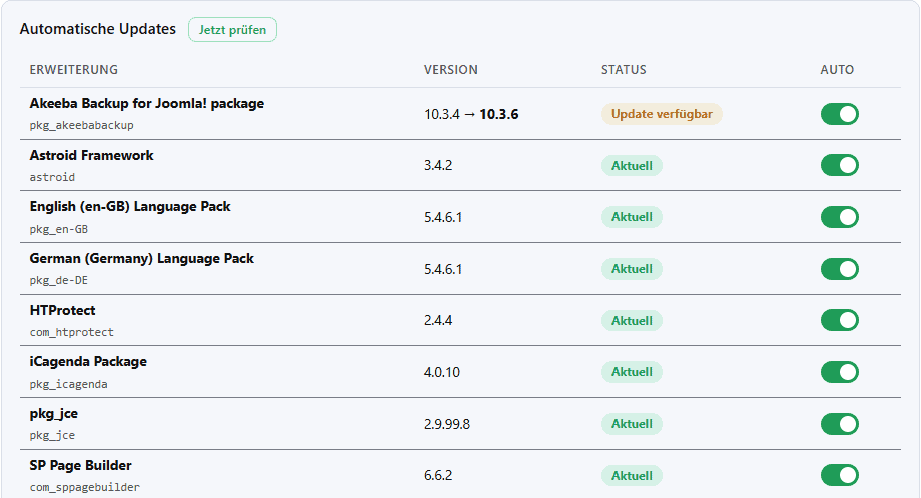
HTProtect brings exactly what the core lacks: automatic updates for extensions, but with protection. By default, everything is off at first, and you deliberately decide what is allowed to run automatically (opt-in). You can enable it in two stages:
Stage 1, security priority: Extensions for which a known security vulnerability exists are automatically updated first. This is the part that keeps botnet attacks off your back.
Stage 2, expand as desired: If you want, you can specifically add more extensions, one by one via the opt-in list. That way, you decide for yourself how far the automation should go.
You choose the interval: immediately (every 15 minutes), daily, or weekly, each with a freely selectable time and, for the weekly schedule, also a day of the week. One thing is hard-wired: security updates always run immediately, no matter which interval you have set. An open vulnerability does not wait until Sunday night.
There is also a selectable grace period (soak): none, 3, 7, or 14 days. A regular update is only installed once it has been available that long without anything new coming in after it. This catches newly faulty or slipped-in releases before they reach your site. Again, the exception is security updates: they ignore the grace period and run immediately. Closing the vulnerability takes priority.
The safety net in detail
This is the real heart of it. Before every update, HTProtect automatically creates a backup of the files and the affected database tables. The principle is simple: no backup, no update. If something goes wrong, a one-click rollback brings you back, and several good previous versions are kept, not just the last one.
After the update, HTProtect checks two things: Is the site still running properly at all (health check)? And are the newly installed update files free of malicious code (malware scan)? If either check fails, broken site or malware found, HTProtect automatically rolls back to the previous state. To keep this from becoming annoying, fail-open applies: a mere scan timeout does not trigger a false rollback; there must be an actual finding.
For security updates, the logic is deliberately reversed. Here, a malware suspicion does not block the update, because closing the vulnerability has priority. Instead, you receive the suspicion as a warning by email and can take a look at it calmly. And if the download source of an extension is suddenly different from before, HTProtect stops the auto-update until you confirm it manually. The simplest protection against slipped-in update servers.
Auto-updates with care, not indiscriminately
A safety net reduces risk, it does not eliminate it. That is why my clear practical advice is: do not enable automation across the board for every extension. Start with what really matters, namely the security-related extensions and those known to be reliable and well maintained. Observe a few runs, and only when that works smoothly should you add more step by step. A sensibly chosen grace period will keep the freshly unstable releases away from you anyway.
And despite all the automation: your site remains your site. HTProtect is a tool that takes routine work off your hands and catches a large share of mistakes, but it is no guarantee that nothing will ever go wrong, and it is no substitute for keeping an eye on your installation. In WordPress, automatic updates have long been a core feature, and there too they are used with experience and judgment, not blindly. That is also the idea here: you decide what runs, and you keep control of your site. The safety net is on your side.
False alarm? Everyone benefits from that
Honestly, a malware hit during an update is in most cases a false alarm: a new release looks briefly suspicious to the scanner, but is clean. So it does not keep slowing you down, such findings are reported back anonymously and centrally. Anonymous means anonymous, with no site-related and no personal data. I evaluate this centrally and adjust the anti-false-positive signatures in the feed. On the next run, the same update goes through smoothly.
What I like best about it is that it works both ways. If an extension update really turns out to be highly problematic, I can immediately suspend it centrally for all users. That means for you: a problem that appears somewhere once is shortly afterwards defused for the whole swarm. You benefit on every site where HTProtect is running.
HTProtect informs you by email about everything important: pending updates, rollbacks performed, a changed update source and, if desired, also successes. Bundled, not as a spam avalanche.
What else HTProtect does
Auto-update is just one building block. HTProtect hardens the .htaccess and protects the backend with a password, blocks PHP execution in upload folders such as /images or /tmp, and includes a real-time firewall that catches known Joomla exploits (JCE, SP Page Builder and others), including in POST requests, where many filters look the other way. Add to that the malware scanner, a watchdog for file changes, suspicious admin accounts, defacement and SEO spam, plus signed live signature updates. How deeply you want to run it is shown by the practical guide to securing Joomla and the article on the Joomla firewall.
Outdated extensions are a real entry point, and keeping up with them manually is tedious. HTProtect closes this gap with automatic extension updates and a safety net of backup, rollback and malware scanning, free of charge. Use it carefully and it will take a lot of routine work off your hands. Download and install HTProtect now. The project is funded by voluntary donations; if it helps you, the coffee fund appreciates it.
Frequently asked questions
Can Joomla update extensions automatically on its own?
No. Since Joomla 5.4, only the core itself updates automatically; you install extensions manually with a click. HTProtect adds automatic extension updates, along with a safety net of backup, malware scan, and rollback. It is best not to enable them across the board, but selectively and step by step.
Are security updates installed immediately even if I have chosen a longer interval?
Yes. Security updates always run immediately and ignore both the configured interval and the grace period. A known vulnerability is closed as quickly as possible; everything else follows your settings.
What happens if an update breaks my site?
HTProtect detects this through the health check after the update and automatically rolls back to the working previous version. In most cases, you do not need to intervene and do not need a separate backup restore by hand. You should still keep an eye on your site afterward.
Does the automatic update feature cost extra?
No. HTProtect is a free Joomla component, and the secured auto-update is included. There is no Pro tier you would need for it.
Questions or something unclear? Feel free to write it in the comments below the article.
- Details
- Last Updated: 28 June 2026
